A Look Into Our Engine: Batching
04 November 2025
This blog post outlines the creation workflow of the Batching we use inside our custom engine. Prepared by Lead Gameplay Programmer Marc Casanova Torrequebrada, UPC student specializing in game programming.
Introduction
What’s the problem?
- We want to create many different objects, each with different materials, textures, etc., regardless of the size of the mesh.
For each asset, the engine creates a new Vertex Buffer Object (VBO), Element Buffer Object (EBO), and Vertex Array Object (VAO). Each unique VAO, VBO and EBO results in a separate draw call.
What is the CPU cost of rendering a scene with 100,000 triangles distributed across 100 meshes of 1,000 triangles each?
The cost of each draw call includes: ○ Setting the VAO ○ Setting the model matrix uniform ○ Binding the material ○ Binding textures ○ Issuing the draw command
How can we optimize driver overhead?
- By packing meshes into large buffer batches, we can reduce the number of draw calls, ideally rendering them all in a single call, or in as few calls as possible.
That is the idea behind Batching.
Approach
Create a new Geometry Batch class to store all geometry data from multiple meshes.
For this Geometry Batch class, we need:
- A list of all mesh components in the batch
- A list of all unique resource meshes
- A single VBO containing vertex data concatenated from all resource meshes
- A single EBO containing index data concatenated from all resource meshes
- A VAO defining the input layout for the batch
A mesh is assigned to a Geometry Batch if matches all of the following features (examples):
- Draw mode
- Metallic property
- Bones
- Double-sided flag
- Transparency
- Wind effect
If a mesh does not match any existing Geometry Batch, a new batch will be created.
At the start of each level, when the scene is loaded with its Game Objects and their respective mesh components, we request a batch for each mesh. This is where a new class, the Batch Manager, becomes relevant.
The Batch Manager is responsible for handling all Geometry Batches. It can request, create, remove, load, unload, and render batches as needed, centralizing the management of batched geometry and ensuring efficient rendering.
Once all meshes from the scene have been assigned to their corresponding batches, we proceed to load the data required for rendering each batch. During this process, we keep track of the total number of components, unique meshes, materials, and models matrices. We also populate all the GPU buffers necessary for rendering, ensuring that the GPU has the exact memory layout of positions, tangents, normals, texture coordinates, joints, weights, and indices.
Now that everything is set up, we can start rendering! The camera’s frustum culling determines which meshes need to be drawn each frame, allowing the Batch Manager to call only those Geometry Batches that contain at least one visible mesh. Each mesh component knows which Geometry Batch it belongs to.

Once the visible meshes are identified, the Batch Manager groups them by their corresponding Geometry Batch and prepares them for rendering. For each batch, the appropriate shader program is selected based on its properties, such as metallic/specular workflow, transparency, or wind effects. Global data, including camera matrices and render settings, is then sent to the GPU.
Finally, each Geometry Batch is rendered only once, efficiently drawing all visible meshes together while keeping track of total vertices, triangles, and draw calls for performance monitoring.
Well, we have explained the new workflow that batching requires, but how do we send all this information to the GPU, and how do we update the buffers in real-time?
Once the visible meshes are determined, each Geometry Batch prepares draw commands and updates per-instance data just before rendering. Each visible mesh component generates a command specifying how it should be drawn: the number of indices, the number of instances, offsets in the combined vertex and index buffers, and the instance index pointing to its model, bones, and material data stored in the Shader Storage Buffer Object (SSBO). This allows the shader to access per-instance information while rendering multiple meshes in a single draw call.
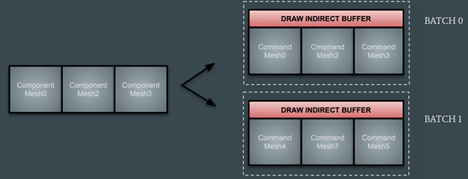
To handle dynamic data such as model matrices, bones transforms, or material matrices, we use double-buffered SSBOs. One buffer is used for rendering the previous frame, while the other is mapped for CPU updates with the current frame data. Once the updates are complete, the buffers are swapped. This ensures that the GPU never reads from a buffer that is being written to, preventing data corruption or stalls and allowing smooth, real-time updates.
Using two buffers requires careful management of when we can swap them. To handle this, we use CPU-GPU synchronization with fences, so the CPU only waits if the GPU is still using the buffer we want to write to. This ensures that all dynamic per-instance data is safely updated each frame, while the draw commands stored in the indirect draw buffer can efficiently render all meshes in a batch with a single draw call.
And with this system in place, batching is fully implemented and operational in our Sobrassada Engine!
Marc Casanova Torrequebrada, Lead Gameplay Programmer at Centuria Games